


Gacha Story - VN Creator
2.8360.00 Reviews
App Specs
- Version
- 1.0.5
- Updated On
- License
- Free
- Downloads
- 1,000,000+
- Developer
- Lunime
- Categories
- Role Playing
- Platform
- Android
Screenshots
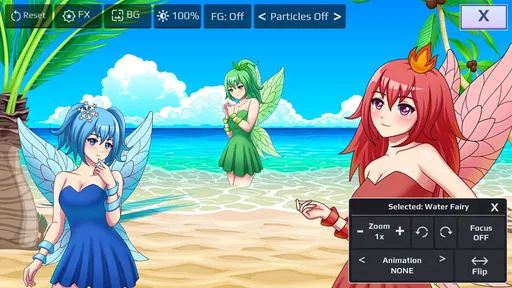
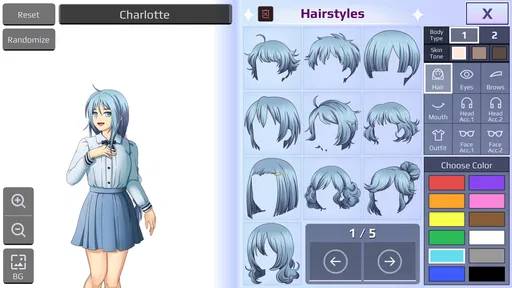
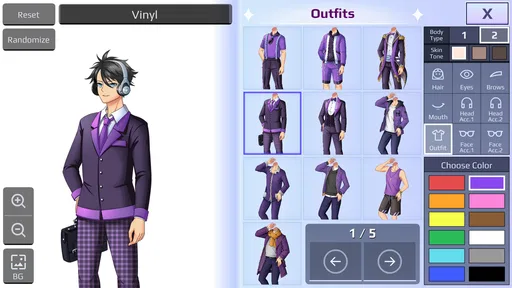
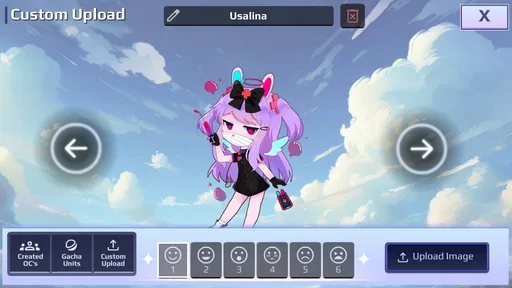
 Analysis by AppCompare
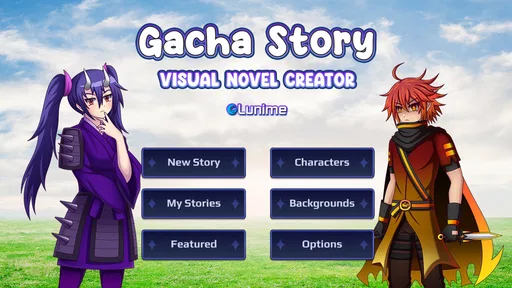
I spent time with Gacha Story as a role-playing game built around making visual novels rather than simply reading or playing through one fixed adventure. That distinction matters. Its main appeal is the chance to turn characters, scenes, and dialogue into a story of your own, then share that creation with friends. I found it more interesting as a creative storytelling tool with game-like presentation than as a traditional role-playing campaign.
The concept is easy to understand, but the experience depends heavily on how much patience you have for arranging details. You are not just choosing dialogue from a finished script. You are shaping the presentation yourself, which makes the app appealing to people who enjoy character creation, dramatic scenes, comedy skits, and fandom-style storytelling. At the same time, anyone expecting a deep combat system, a long conventional quest, or a polished novel written for them may feel that the focus is somewhere else.
Creating stories instead of following one fixed adventure
Lunime is the developer behind this game, and the familiar Gacha approach gives the project a recognizable visual identity. Characters are designed to be expressive and customizable, making it possible to build a cast that feels personal even before the writing begins. I liked that the creative process starts with the people in the story. A strong cast can make a short scene feel worthwhile, while a weak cast can leave even a carefully arranged scene feeling empty.
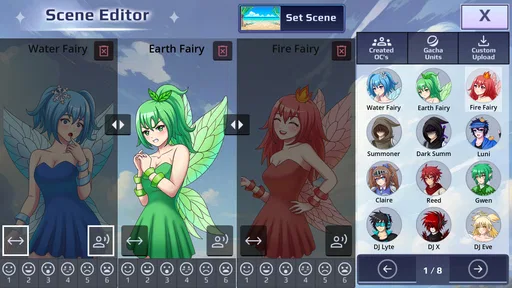
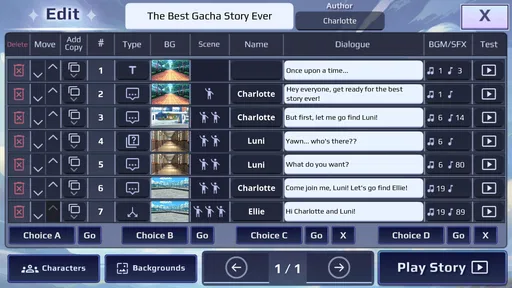
The central idea is to create visual novels and share them with friends. In practice, that means thinking like a director as much as a player. You decide who appears, how a scene is staged, what the characters say, and how the story moves from one moment to the next. This is a different rhythm from ordinary role-playing games, where the developer has already decided the plot and your choices mainly affect progress.
My first useful tip is to outline a story before placing every scene. Even a simple beginning, problem, and ending helps prevent the project from becoming a collection of disconnected conversations. The freedom to add characters can be tempting, but a smaller cast is usually easier to follow and gives each person a clearer role. I found that planning the emotional purpose of a scene first made the creative tools feel less overwhelming.
The game is free, which makes trying the basic experience uncomplicated from a cost perspective. I would still separate “free to access” from “guaranteed value for everyone.” There is no purchase price to justify, but your time is the real investment. If you enjoy constructing stories, that trade can be excellent. If you only want quick entertainment, the amount of arranging and revising may not feel rewarding enough.
It is listed for Everyone, so the presentation is aimed at a broad audience. That makes it approachable for younger creators as well as adults who enjoy anime-inspired character design and light storytelling. However, an age label does not automatically mean every user will find the creative process simple. Younger players may need help understanding how to organize a longer story, while experienced writers may want more control than a mobile-focused tool can comfortably provide.
Worth Reading Before You Choose

EA SPORTS FC Mobile 26 Is a Bigger Football Game, but It Takes Time

Flipboard Shows What News Apps Must Do Beyond the Feed

Switching to Android Auto Means Rethinking Your Driving Routine

Google Calendar Makes a Crowded Week Easier to Manage

Ludo King Makes the Most of the Minutes Between Plans

Baby Panda World Brings Quick Play to Modern Phones, but Its Game Library Feels Busy
How the creative workflow feels in everyday use
I can imagine using it during a short free period after school, on a commute, or while waiting for an appointment. A practical session would be to create one conversation between two characters, give the scene a clear conflict, and stop before trying to build an entire chapter. This small-session approach works better than opening the app with the vague goal of making a huge visual novel immediately.
Another useful workflow is to treat each scene like a storyboard. First decide where the characters are emotionally, then arrange their positions and dialogue, and only afterward worry about polish. This prevents a common problem with creator apps: spending a long time adjusting appearances before knowing whether the story itself works. The visual presentation matters, but it cannot replace a reason for the characters to be speaking.
Sharing also changes how I would use the game. A story made only for yourself can be messy and experimental. A story intended for friends needs clearer context, a readable beginning, and an ending that does not depend on explanations outside the scene. Before sharing, I would play through the whole sequence as a reader rather than as its creator. That is the easiest way to catch missing context and dialogue that sounded clearer in your head than it does on screen.
One non-obvious strength is that the format can help people practice concise writing. A visual novel scene cannot rely entirely on long descriptions because the characters and staging carry part of the meaning. You have to choose what the characters say and what the viewer can understand from the scene itself. For a beginner, that limitation can be useful: it encourages focus instead of endless paragraphs.
The trade-off is that creative freedom can also expose the limits of your own planning. A conventional game quietly handles pacing, escalation, and transitions for you. Here, those responsibilities move to the player. I appreciated the control, but I also found that a good result requires more deliberate thought than the short store summary might suggest.
What the game offers compared with ordinary role-playing titles
Compared with a standard role-playing game, this is much less about leveling a hero and overcoming a sequence of battles. The reward comes from seeing an idea become a playable or readable scene. That makes it closer to a lightweight visual-novel creator than to a traditional adventure. Players who want exploration, equipment choices, or a carefully authored campaign should look elsewhere.
Compared with a typical visual-novel reader, the important difference is authorship. Most visual novels give you a finished narrative and ask you to follow it. Here, the fun comes from constructing the narrative yourself. That is valuable for people who already imagine alternate scenes for their favorite character types, but it may feel empty to someone who wants professional pacing, complex branching, or a fully written cast.
It also differs from a general writing app. A blank document offers more freedom for prose, but it does not provide the same character-focused, scene-oriented presentation. This game is better when you want the visual arrangement and character performance to be part of the idea. A writing app is better when your priority is long-form text, editing, research, or precise control over formatting.
That comparison explains why the average rating is 2.8 from around 4.7 thousand ratings, alongside roughly 360 written reviews. I would not treat that figure as a complete judgment of the concept. A creator-focused game can divide people more sharply than a simple puzzle or story reader because satisfaction depends on whether the user actually wants to make content. Still, the rating is a useful reminder to keep expectations realistic: the idea may appeal strongly to one audience and barely interest another.
The game has passed one million installs, so it is not an obscure experiment with no audience. That level of adoption suggests that the Gacha-style creative format has broad curiosity behind it. It does not mean every creator will find the workflow deep enough for serious projects, but it does make sharing with friends more plausible than with a completely unknown tool.
Where the free price creates value, and where it does not
Because the listed price is free, I judge the value by accessibility and usefulness rather than by whether it replaces a paid creative suite. The strongest value is the low barrier to experimentation. You can try the concept without first deciding that you are committed to writing a full visual novel. For a young creator or a casual fan, that is a meaningful advantage.
The free model also makes it suitable for collaborative ideas between friends. One person can imagine the plot, another can suggest character personalities, and a third can read the finished scenes. Even without treating it as a serious production tool, it can turn an inside joke or a small dramatic idea into something shareable. The best results are likely to come from short projects that have a clear purpose.
I would not call it a replacement for a dedicated visual-novel engine, professional illustration software, or a full writing application. Those alternatives are preferable when you need extensive branching, advanced editing, detailed asset management, or a project designed for publication. The benefit here is convenience and approachability, not professional depth.
There is also a difference between sharing a story with friends and building a public audience. The first is a straightforward reason to create. The second requires more attention to clarity, originality, and presentation. I would begin privately, ask one or two people where they became confused, and revise from there. That feedback loop is more valuable than adding extra characters simply to make the project look larger.
My second advanced tip is to create reusable character roles rather than rebuilding the same personality from scratch in every project. A reliable protagonist, skeptic, comic relief character, or rival can become part of your personal toolkit. The point is not to repeat the same story, but to reduce setup time so you can spend more energy on the scene’s actual conflict.
Limitations that affect the decision
The first limitation is the possibility of a shallow experience for players who do not enjoy creating. There is no reason to expect the same satisfaction as a finished role-playing adventure when the main attraction is authoring scenes. If you download it hoping for a long campaign with constant progression, you may quickly wonder what you are supposed to do next.
The second is the burden of pacing. A creator can make a scene technically complete but emotionally flat. Characters may stand in place exchanging lines without a strong reason for the conversation. This is not necessarily a flaw in the app itself, but it is a real friction point in the experience. The tools can help you present an idea; they cannot automatically supply dramatic structure.
A third trade-off is the tension between recognizable Gacha aesthetics and originality. The visual style makes characters approachable, but creators still need to give those characters distinct motivations and voices. Changing hair, outfits, or expressions can make a cast look different, yet visual variety alone does not make a story memorable. I would spend more time on what each character wants than on making every design elaborate.
Device compatibility is relatively broad: the game requires Android 7.0 or later. That is helpful for people using older supported Android devices, although the actual comfort of creating may still depend on screen size and how easily you can manage scenes. A small phone can be fine for quick edits, but longer sessions may be more comfortable on a larger display. I would especially consider this if you plan to review dialogue repeatedly or build several connected scenes.
The current version is 1.0.5, which places the app in an early stage from my perspective. That does not make it unusable, but it does make me more cautious about treating it as a finished replacement for mature creation software. Anyone starting a large project should keep their ideas organized outside the game as well. A simple outline or separate notes can protect you from losing track of characters, scenes, and intended endings.
My third practical tip is to keep a “scene purpose” note for every section. Write one sentence explaining what changes by the end: a secret is revealed, a friendship is tested, a plan fails, or a decision is made. If nothing changes, the scene may be decorative rather than necessary. This small check helps prevent the most common weakness of homemade visual novels: conversations that sound pleasant but do not move the story forward.
Who will get the most from it
I think the best audience is someone who already enjoys Gacha character creation and wants to give those characters a reason to exist beyond a single image. It is also a good fit for beginners who want to experiment with visual storytelling without starting with a complex desktop tool. If you like writing short scenes, making alternate-universe stories, or sending creative projects to friends, the free entry point makes it easy to test.
It may also suit parents or educators looking for a gentle way to introduce basic story structure, provided the user receives guidance and the sharing aspect is handled thoughtfully. The useful lesson is not only how to arrange characters, but how to build a beginning, create a problem, and give the scene a satisfying change. I would encourage short, self-contained projects before attempting a long series.
Fans who prefer reading over writing should approach it differently. You may enjoy discovering what other people make, but the core value still comes from creation. If your ideal mobile session is opening a finished story and relaxing immediately, a conventional visual novel will probably serve you better.
I would also skip it if you need professional publishing features, intricate branching logic, detailed prose editing, or a robust production pipeline. A dedicated engine is the better choice for those goals, even if it takes longer to learn. Likewise, players seeking action, combat, exploration, or character statistics should choose a conventional role-playing game instead of expecting those elements to appear here.
My verdict after weighing the trade-offs
Gacha Story is worth trying when your idea of fun includes making the story rather than merely consuming it. Its free price removes the biggest financial barrier, its Everyone rating keeps the concept broadly approachable, and its Gacha-inspired presentation gives beginners an inviting way into visual storytelling. I found the strongest value in short projects, personal experiments, and stories made specifically to share with friends.
My recommendation comes with a clear condition: start small. Make one scene, give it a purpose, test it with someone else, and only then expand. That approach reveals whether the creative workflow suits you without turning the first attempt into an exhausting commitment. It also makes the game’s strengths more visible because you are using its presentation for a focused story instead of asking it to carry an oversized project.
For me, the app is not a substitute for a finished role-playing adventure or a professional visual-novel development environment. It is a free, accessible space for turning character ideas into simple interactive-style stories. If that sounds like the kind of creative project you would actually enjoy finishing, I would recommend giving it a chance. If you want the game to provide the plot, progression, and challenge for you, I would skip it and choose a more traditional role-playing title.
Pros
- Simple drag-and-drop tools make basic VN creation approachable.
- Character and scene customization supports varied story concepts.
- Useful for experimenting with dialogue pacing and branching choices.
- Story projects can be developed directly on a mobile device.
- Anime-inspired visuals suit fans of casual narrative games.
Cons
- Advanced creators may find the editing and scripting options limited.
- Large projects can become difficult to organize on a small screen.
- Some assets or features may require in-app purchases.
- Performance may vary on older Android and iOS devices.
- Stories depend heavily on available templates and character assets.
FAQs for Gacha Story - VN Creator
What is Gacha Story - VN Creator?
Gacha Story - VN Creator is a mobile storytelling and visual-novel creation app built around customizable Gacha-style characters and scenes. It allows users to develop dialogue-based stories, arrange characters, select backgrounds, and create dramatic or comedic episodes. It is aimed at fans of Gacha content, roleplay, and interactive fiction who want to create stories without needing advanced animation or game-development skills.
Can I create complete visual novels with Gacha Story - VN Creator?
The app is best suited to creating scene-based stories, character conversations, and visual-novel-style episodes rather than fully complex commercial games. You can usually combine characters, expressions, backgrounds, text, and story progression to produce a narrative experience. However, the available tools may be more limited than those found in dedicated visual-novel engines, especially for advanced branching paths, sophisticated animations, or detailed scripting.
Is Gacha Story - VN Creator free to download and use?
Gacha Story - VN Creator may be available as a free download, but users should check the current store listing for details about advertisements, optional purchases, locked content, or premium features. Free access can vary by platform and version. Before downloading, review the app’s pricing information and permissions so you understand whether additional content or tools require payment after installation.
Is Gacha Story - VN Creator suitable for children?
The app may appeal to younger users because of its colorful character design and simple creative tools, but parental guidance is still recommended. User-created stories can include themes, language, or situations that are not appropriate for every age group. Parents should review the app’s content rating, privacy policy, advertising behavior, and any sharing or community features before allowing a child to use it independently.
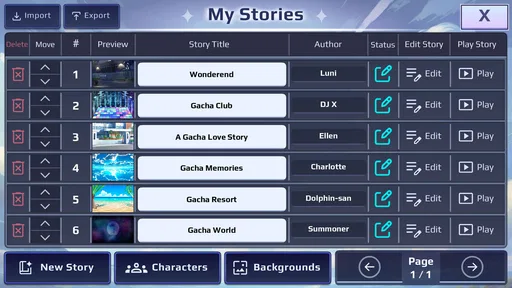
Can I save or share stories created in Gacha Story - VN Creator?
The available saving and sharing options depend on the app’s current version and your device. In general, a creator-focused app may let you save projects locally, export scenes as images or videos, or share finished content through other applications. It is wise to save work regularly and confirm whether projects are backed up, because uninstalling the app, changing devices, or clearing storage could remove locally saved creations.


